Play Together for iOS – Download, Features, Gameplay & Guide (2026)
Play Together for iOS is a social simulation game that lets you create your own character, explore a colorful virtual world, meet other players, play mini games, decorate your home, collect pets, and take part in different activities with friends. On iPhone and iPad, the game offers a large-screen mobile experience with touch controls and online multiplayer features.
What Is Play Together for iOS?
Play Together for iOS is the iPhone and iPad version of the popular social simulation game. Instead of following a single traditional storyline, the game gives players a virtual environment where they can socialize, customize their characters, complete activities, participate in mini games, and explore different areas. The main attraction is its social gameplay. You can interact with other players, customize your avatar, build your own style, participate in events, and spend time exploring the game world.
It is more than a simple mini-game collection because the game combines several elements, including:
- Social multiplayer gameplay
- Avatar customization
- Virtual homes
- Pets and collectibles
- Mini games
- Fishing and exploration
- Character progression
- Events and seasonal content
- Online communication
- Game Center support
The App Store currently lists the game as a Casual title and gives it a 9+ age rating.
Is Play Together Available on iPhone?
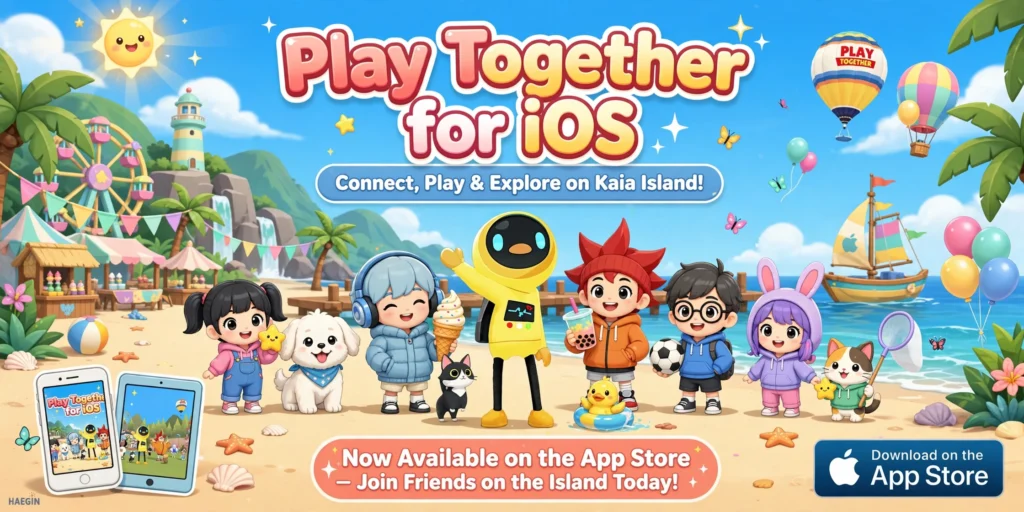
Yes. Play Together is available for iPhone, and the official App Store listing currently states that the game requires iOS 15.0 or later. It is also available for iPad through the App Store. This means you do not need an Android emulator or a separate APK file to play the standard iOS version. On a compatible Apple device, the normal approach is to install the game through the App Store. Before installing it, make sure your iPhone has:
- iOS 15 or newer
- Enough free storage
- A stable internet connection
- An active Apple ID
- Sufficient battery during the initial installation
The listed app size is around 2.5 GB, so it is a good idea to keep additional free storage available for updates and game data.
Play Together for iOS Download
The safest way to get Play Together for iOS is through the official App Store listing rather than downloading an unknown IPA file from a third-party website.
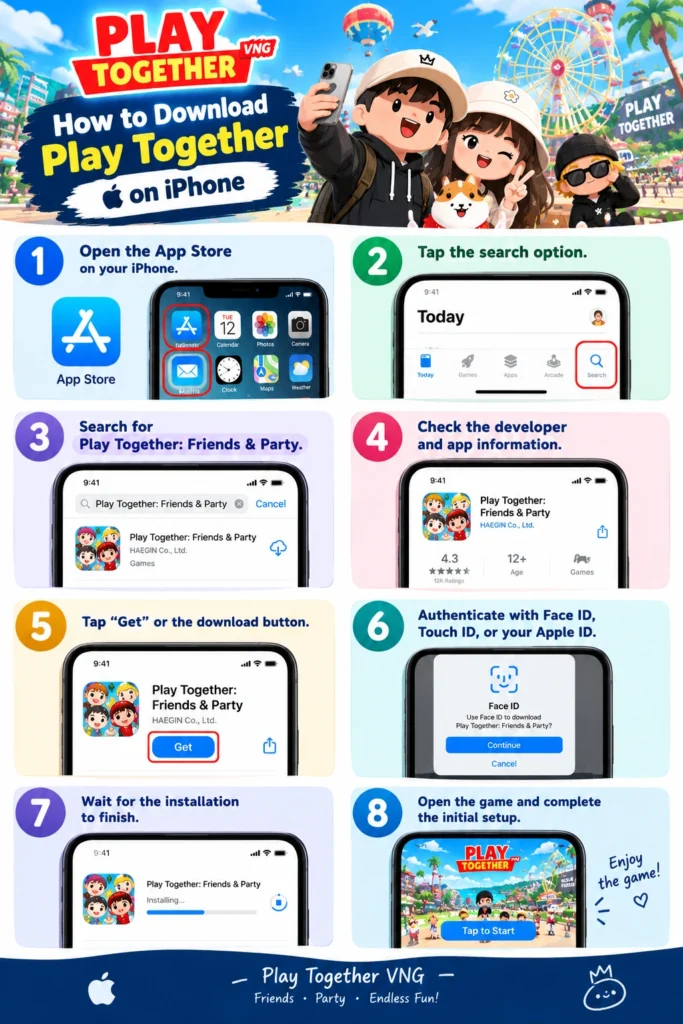
How to Download Play Together on iPhone
- Open the App Store on your iPhone.
- Tap the search option.
- Search for Play Together: Friends & Party.
- Check the developer and app information.
- Tap Get or the download button.
- Authenticate with Face ID, Touch ID, or your Apple ID.
- Wait for the installation to finish.
- Open the game and complete the initial setup.
The official App Store listing identifies the provider as HAEGIN Co., Ltd. and currently lists iPhone, iPad, and iPod touch compatibility with iOS 15.0 or later.
What About Play Together VNG for iOS?
This is an important point because Play Together and Play Together VNG can be searched separately depending on the user’s region. VNGGames operates an official Play Together VNG platform with dedicated news, events, guides, community information, and game updates. The official website currently shows recent updates including version 2.32. If you specifically want the VNG version, always check the availability for your Apple ID region rather than assuming that every country receives exactly the same listing. The VNG platform also publishes information about maintenance, events, game features, and updates. For example, recent official updates have introduced new seasonal activities, events, pets, mini games, and other content.
Play Together iPhone Features
One of the biggest reasons people enjoy Play Together for iOS is the number of activities available inside the virtual world.
1. Create and Customize Your Avatar
You can create a character and customize its appearance according to your preferred style. Players can experiment with different outfits and visual combinations instead of using the same default appearance throughout the game. This makes avatar customization an important part of the overall Play Together experience.
2. Explore Kaia Island
Kaia Island is one of the recognizable locations associated with the Play Together world.
Instead of simply entering a match and leaving after it ends, players can explore the environment, interact with different elements, participate in activities, and meet other players.
3. Play Mini Games
Mini games add variety to the gameplay. Depending on the available content and events, players can take part in different challenges and activities to earn rewards and progress through the game. This is particularly useful for players who prefer short gaming sessions instead of spending an entire evening on one activity.
4. Meet Other Players
The social side is one of the main features of the game. You can interact with other players, spend time together, participate in activities, and communicate through the game’s available social features. The App Store listing also identifies messaging and chat among the game’s features.
5. Customize Your Home
Your virtual home gives you another area to personalize. You can work on the appearance of your space and use available customization options to create an environment that matches your preferred style.
6. Collect Pets
Pets are another part of the game’s collection system. Different events and updates can introduce new pets and related activities. The official VNG update history shows that recent content has included new pet-related features and collectibles.
7. Participate in Events
Play Together regularly receives events and limited-time content. The official VNG website currently publishes update announcements, event information, maintenance notices, and guides. Recent updates have included seasonal festivals, mini games, collectibles, pets, and special rewards.
Why Play Together Works Well on iPhone
The iPhone version is convenient for players who prefer portable gaming. You can pick up your phone, open the game, and quickly join the virtual world without needing a PC or separate gaming hardware. Another advantage is the touch interface. Movement, menus, interaction, and other controls are designed around a mobile screen, making the game easy to access when you are away from your computer. For newer iPhones and iPads, the larger display can also make character customization, exploration, and mini games more comfortable.
Play Together for iOS System Requirements
Here is the basic compatibility information currently listed by the App Store:
| Requirement | Details |
| Platform | iPhone / iPad |
| Minimum OS | iOS 15.0 or later |
| App Size | Around 2.5 GB |
| Category | Casual |
| Age Rating | 9+ |
| Game Center | Supported |
| In-App Purchases | Available |
| Internet | Required for online features |
The App Store listing should be checked before installation because compatibility and app requirements can change with future updates.
How Much Storage Does Play Together Need?
The current App Store listing shows an app size of approximately 2.5 GB. However, you should not keep exactly 2.5 GB free and expect everything to work perfectly. Game updates, temporary installation files, cached resources, screenshots, and other iPhone data can require additional storage. For a smoother installation experience, keeping several extra gigabytes available is a better approach.
Is Play Together Free on iPhone?
The game can be downloaded through the App Store, but it includes in-app purchases. The current listing shows multiple optional purchase packages and memberships. You can therefore start playing without treating the game as a traditional premium paid download, while optional purchases are available inside the game. Parents should also be aware that the App Store listing indicates in-app purchases, advertising, messaging/chat, and loot boxes.
Play Together for iOS Gameplay Experience
The biggest difference between Play Together for iOS and many conventional mobile games is the relaxed gameplay style. You are not forced to spend every minute fighting enemies or completing competitive matches. Instead, you can decide what you want to do. One day you might focus on mini games. Another day you might customize your avatar, interact with friends, explore the island, work on your home, or participate in an event. That freedom makes the game suitable for players who enjoy social and casual gaming.
Play Together for iOS Controls
The iOS version uses touchscreen controls designed for mobile devices. Basic movement and interaction are handled through on-screen controls, while menus provide access to customization, inventory, activities, and other game functions. If you are playing on an iPad, the larger display can make some menus and interactions easier to view. The exact interface can change with future game updates, so controls may look slightly different between versions.
Play Together VNG Updates and Events
Regular updates are an important part of the Play Together VNG experience. The official VNG website maintains an update section where players can check new versions and event announcements. As of October 2026, the official website lists version 2.32, dated October 1, 2026. Earlier 2026 updates included seasonal events, new mini games, pets, farming content, special locations, and limited-time rewards. This continuous content cycle helps keep the game from feeling exactly the same every time you open it.
Personal Experience With Play Together for iOS
From my experience with Play Together for iOS, the strongest part of the game is the freedom it gives you after entering the virtual world. It does not feel like you have to follow one fixed path. I particularly like the combination of social interaction, avatar customization, mini games, and exploration. On iPhone, the touch controls make it easy to move around and switch between different activities. Another thing I noticed is that the game feels more enjoyable when you play with friends. Exploring the world alone is fine, but completing activities and spending time together makes the social features much more meaningful. I would also recommend checking your available storage before installing the game because the current App Store listing is already around 2.5 GB.
How to Get Better Performance on iPhone
If Play Together for iOS feels slow or starts experiencing frame drops, try these simple steps:
Keep Enough Free Storage
Avoid filling your iPhone’s storage completely. Keeping reasonable free space can help your device manage apps and temporary files.
Close Unnecessary Apps
Before starting a long gaming session, close apps you do not need.
Use a Stable Internet Connection
Because Play Together contains online social features, a stable connection is important. Wi-Fi is usually preferable when downloading large updates or game resources.
Keep iOS Updated
Use a supported iOS version and install available system updates when appropriate.
Avoid Excessive Background Activity
If your device is running many demanding processes simultaneously, gaming performance may suffer.
Common Play Together for iOS Problems
Game Is Not Installing
Check your available storage first. Since the listed app size is around 2.5 GB, insufficient storage can prevent installation or updates.
Game Is Crashing
Restart your iPhone and make sure both iOS and the game are updated. If the issue continues, check whether other players are reporting the same problem through official game channels.
Play Together Is Not Available in My App Store
App availability can vary by Apple ID region. If you are specifically looking for the VNG release, check the official VNGGames channels for your region rather than downloading an unofficial IPA.
Game Is Taking Too Much Storage
The listed app size is only one part of the storage situation. Additional game resources and cached data may increase the total space used on your device.
Internet Connection Is Unstable
Try switching between Wi-Fi and mobile data to determine whether the problem is network-specific. For large downloads and updates, Wi-Fi is generally the more practical option.
Is an IPA Required for Play Together on iPhone?
No, not for the standard App Store installation. If the game is available through your regional App Store, there is normally no reason to manually install an IPA file. Third-party IPA websites can also create unnecessary security and compatibility concerns. For a regular iPhone user, the official App Store is the better installation method. If you specifically need Play Together VNG for iOS, availability should be checked through the official VNGGames distribution channels for the relevant region.
Play Together for iOS vs Android
The core game experience is similar across supported mobile platforms, but the installation process is different. On iPhone, the normal route is the App Store. Android users generally install compatible versions through Google Play or the official distribution method available for their region. The iOS version is especially convenient for users already inside the Apple ecosystem because game installation, updates, and account management can be handled through Apple’s platform.
Play Together for iOS vs PC
Play Together is primarily designed as a mobile experience, but players who prefer larger screens may look for PC options. An iPhone provides a simpler setup because there is no emulator configuration. You simply install the compatible version and start playing. PC gaming can provide a larger display and keyboard or mouse options where officially supported, but the mobile version remains the most straightforward choice for iPhone users.
Is Play Together Safe to Download?
The safest option is to download the game through the official App Store listing or an official publisher distribution channel. Avoid random websites offering modified versions, suspicious IPA packages, unlimited currency, or unauthorized game files. The official App Store listing identifies the provider and provides information about compatibility, purchases, privacy practices, and age rating. For VNG users, the official Play Together VNG website is also a useful source for game updates, events, guides, and announcements.
Final Verdict
Play Together for iOS is a strong choice for players who enjoy casual social games rather than traditional competitive titles. Its combination of avatar customization, virtual homes, mini games, pets, exploration, events, and online interaction gives players plenty of activities to explore. The current App Store listing requires iOS 15.0 or later and lists the game at around 2.5 GB, so checking your iPhone’s compatibility and free storage before installation is recommended. For users specifically interested in the VNG version, the official VNGGames platform provides current updates and event information, including the latest listed version 2.32 from October 2026. Overall, if you want a colorful multiplayer world where you can socialize, customize your character, play mini games, collect pets, and simply spend time with friends, Play Together for iOS is worth trying.